My Photography Blog
Welcome to the Chris Kendrick Photography Blog, where I share the stories, challenges and inspirations behind shooting Lake District landscapes and working as a Cumbria-based photographer. Alongside behind-the-scenes reflections from the fells and lakes, you'll also find honest photography gear reviews, covering the cameras, lenses and accessories that genuinely perform in real Lake District conditions. Whether you’re passionate about landscape photography, exploring Cumbria’s scenery, building your kit, or simply curious about the craft, there’s something here for you.
Some posts include affiliate links; thank you if you choose to support the blog through a qualifying purchase. If there’s a topic or piece of gear you’d like me to cover, let me know. Enjoy exploring!
Enjoy!

I Finally Ditched my Apple Magic Mouse and it Changed my Life.
The Logitech MX Master 3S completely changed how I work. From custom shortcuts to seamless scrolling and ergonomic design, this isn’t just a mouse — it’s a serious productivity upgrade for photographers and creatives.
This isn’t a blog I ever expected to write. I loved my Apple Magic Mouse — but like everyone else, I had one major issue: when it runs out of battery, you can’t use it while it charge and until I had upgraded, I hadn’t realised what I was missing out on.
Whoever decided to put the charging port on the bottom clearly wasn’t thinking about real-world use.Whoever decided to put the charging port on the bottom clearly wasn’t thinking about real-world use.
This blog contains Amazon affiliate links; if after clicking of these, you make a purchase, I may receive a small kick back at no cost to you. This is great way to support the blog and allows me to get out and explore, review products and keep the content coming for this blog
Part of not wanting to move to any other mouse was down to me being a bit of an Apple fanboy and thinking they could do no wrong, but I saw some videos on YouTube whilst I was researching the Logitech MX Creative Console, and a lot of reviewers were talking about the MX range of mice and these piqued my interest. People were also talking about the keyboards that Logitech made, and it just so happened that I was on the lookout for a new keyboard after my Apple keyboard died and wouldn’t recharge. I had been making do with a cheap keyboard from Amazon, but I knew that this was a relationship that wasn’t going to last.
As I was browsing for keyboards, I found a deal on the keyboard which allowed me to buy the keyboard and the MX3 mouse was thrown in for an extra £10. Couple this with the corporate discount scheme that I am a member of and I had an offer than I couldn’t resist - they went straight in my basket. (I got the MX Keys S by the way, and it’s the best/nicest keyboard I have ever owned).
Now this isn’t intended to be an in depth review, more of an overview, but I will say that as per the title, this has been a life changer for me. The scroll function is much better, it feels smoother moving across my desk pad and the buttons are much quieter but still have a satisfying click. The ergonomics on this thing are awesome and it feels it feels great in the hand, with everything easily reachable without adjusting your grip. Oh, and it’s also fully customisable so you can make it do an absolute ton of things.
One of the things that has been great for me is the thumb wheel. This is configurable, but I am using it scroll between different tabs, especially when browsing. I need to have things open so I can switch between them when I am researching or need to look at different sources of information and having two browser windows open is just not enough!
The thumb wheel however isn’t just for switching tabs - that’s just what it does in one of its configurations. In Photoshop I have it mapped to brush size, in Premier Pro it scrolls my time line horizontally and in Lightroom I have it set to zoom in and out of my images.
Underneath the thumb wheel are two buttons (call front button and back button), which I have mapped to copy and paste in all applications and then there is the gestures button, another multifunction area of this mouse. I won’t bore you with all the mappings that I have set up, but having the ability to alt+tab between windows, without actually having to alt+tab is, for a new mouse nerd, awesome.
The LogiOptions+ app is where you can set all of your customisations up, and it’s really easy to do. I like doing this kind of thing and making my tools work for me, but even if this isn’t your kind of thing, it’s really quick and it’s really straightforward.
But the biggest plus for me? I can charge this thing without having to be without my mouse for a couple of hours. The charging is pretty swift (via USB C) and the battery lasts for well over a couple of weeks - I am not a heavy user, everything I am doing is related to either my photography or this website, I’m not using it for gaming, it’s very much studio/office/admin work so granted, the battery isn’t taking much of a hammering.
Compared to the Magic Mouse, this feels like a tool designed for actual productivity rather than aesthetics.
Should You Get One?
If you’ve got the budget — yes.
This is one of those tools that quietly transforms how you work. More speed, less friction, and far fewer interruptions.
Who Should Buy One?
Photographers
Videographers
Editors
If your workflow relies on shortcuts, fast navigation, and switching between apps, this will genuinely improve your efficiency.
If you’re just doing basic admin, it’s probably overkill.
Found this useful?
You can support the blog by buying me a coffee — every bit helps me keep producing free, high-quality content.
Want more like this? Join my mailing list for photography tips, gear reviews, and practical advice designed to help you get better results from your kit.
Click the links to below to read some of my previous blog posts.
Gear Review: Godox X3 Pro Wireless Touchscreen TTL Flash Trigger.
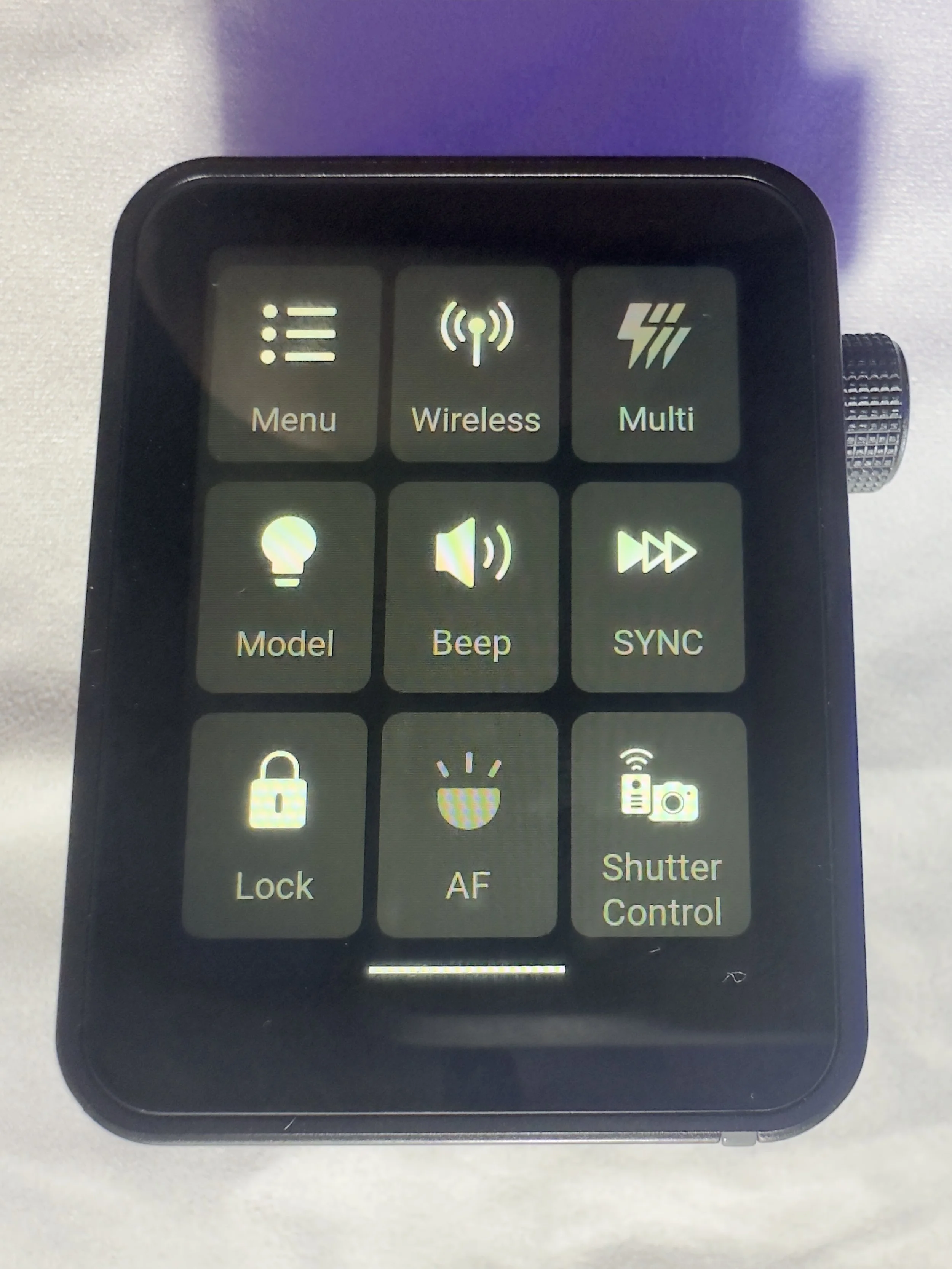
The Godox X3 Pro is a compact, touchscreen flash trigger designed for Canon photographers who want fast, reliable control over off-camera lighting. In this review, I take a practical look at how the X3 Pro performs in real-world shooting, covering its radio triggering reliability, touchscreen workflow, TTL and High-Speed Sync support, and how it fits into a modern Godox lighting setup. If you’re considering upgrading your flash trigger or moving to a cleaner, more portable lighting workflow, this Godox X3 Pro review breaks down who it’s for, how it performs, and whether it’s worth adding to your kit.
Ahhh, flash triggers! For years (for me at least) these have been unnecessarily difficult to use bits of kit with complicated menus, too many buttons and some of the least intuitive things I have ever had in my photography set-up.
The Godox X3 Pro-C was launched in late 2025, with initial availability starting in September/October 2025 and changed that! It is something that I have been wishing someone would make for a number of years and finally something has come along that ticked a lot of the boxes I was hoping for.
I’ve had a number of different flashes and I still own some of them. One of the first sets was some Neewer off-camera flashes (the catchily titled Neewer NW-562 E-TTL Flash Speedlite), which came with their own triggers and a manual which contained some literal translations which were largely unhelpful. They were a lot of faffing, but once I got some settings dialled in for the transmitter and the receivers, I didn’t change them. I could just about work with the plethora of buttons and dials on the flash to change things like the output power and the zoom, and I did find it handy being able to reposition them. I still have them as they make useful lights that I can hide in scenes to light them more creatively.
I eventually upgraded to some more powerful strobes, this time from Godox and went for the Godox SK400III, which I paired with Godox XPRO-C TTL trigger. This was a real step-up from the previous trigger as now I could set up groups and store some different settings. Again however, I found this really complicated to use. The old style LCD screen was, I found, very confusing, difficult to use and to be quite honest, a bit of a pain. It did however give me some more flexibility and allowed me to do a little bit more. When I say ‘allowed’, what I mean is that I could control the strobes from the trigger rather than having to go and off fiddle with two set of buttons on two different flashes.
More recently, I have taken delivery of the Godox X3 Pro C Wireless Touchscreen TTL Flash Trigger. Yep, you guessed it, I got in the Black Friday sale last year, and I have had a couple of months to play with it before giving you my thoughts. One of my overriding thoughts is that they need to come up with some better names for these things!
This blog contains Amazon affiliate links and I may receive a small kick back if you make a qualifying purchase after you have clicked one of these links. This is a great way to support the blog, so a massive thank you goes to you if you choose to make a purchase, all of the money I make from this goes back into helping me to create reviews for the blog, it’t not a huge amount, but every little helps!
First Impressions:
This is much smaller than previous triggers that I have owned, yet you don’t lose any of the screen real estate that you want with a piece of gear like this. It’s light, which is a real bonus when you’re sticking it on the top of your camera via the hot shoe. One of the other things I like about it is that it has a built in rechargeable batter - HOORAY - no more faffing about with AA batteries which cost a fortune or rechargeable ones that never seem to last very long. The battery is rechargeable via a USB C cable which comes supplied.
It’s a lovely little object to hold, the plastics feel solid and the branding is fairly tame which means it looks quite subtle.
The touchscreen is bright and responsive. It’s also big enough that you’re not forever bumping icons you didn’t mean to and it’s not so sensitive that you’re accidentally changing your settings by just brushing against it.
There are 2 buttons on the right hand side, which give solid feedback when your press them (one of these will test fire the flash and the other is the power/menu button). Finally, on the same side, you have a multifunction wheel, which you can turn to navigate the menus and press to make selections, it has a reassuring click which lets you know you’ve made a selection. This might be handy if you’re working somewhere cold and are wearing gloves, or if you struggle to use your hands to make the changes via the touchscreen.
On the front of the unit there is an autofocus assist beam and at the bottom of it there is mechanical button which retracts a pin on the hot shoe to enable you to release it from the camera when you’re ready to pack down.
It came with about 60% charge already in the battery and to charge it to full took about 45 minutes. I don’t know what the full battery life is, but it’s been enough to get me through a full day’s shooting.
My Experience with The Trigger
I have really enjoyed using it so far. Once I had everything set up (which took no more than a few minutes after I had watched some YouTube videos), I was ready to go and shooting. I had someone booked in for some headshots not long after I took delivery of it and it got me through the whole session with no issues (I did have the old one on standby just incase I ran into any issues), I was able to make range of adjustments which synced to the strobes with no issue.
One thing I really like is that you can scan the 2.4ghz frequencies and the trigger will tell you which channels are the clearest ones for use in the environment you are, and then you can set this on the strobes and the trigger. I use each of my flashes in its own group and I don’t bother with the ID numbers as I am not often working in an environment which requires me to do this. I have however, messed around with creating different groups and using ID numbers for the purpose of this review, and have found that it’s a fairly straightforward process.
There is a slight lag from when you make changes on the trigger to them registering on the flash, whilst this hasn't been an issue for me, it’s something worth knowing. We're talking about delay of less than a second, but I know there are people who aren’t going to be into this.
What other features does it have?
One little ‘'bonus’ feature of this unit is that you can also use it as an intervalometer, but you will need to connect the trigger to the camera with 2.5mm TRS cable (male to male). These are less than a tenner for two if you click the link I have just posted, but a lot of you might find that you already have one of these knocking around at home somewhere, especially if you have purchased flash gear before.
One of the big plusses, for me at least, of this trigger is that it is a radio trigger so this does away with the need for line of sight to enable you to trigger the flash, which gives you some more flexibility on set/location and it saves the need for the use of optical slaves.
Switching between TTL and manual flash is straightforward, which is especially useful when working in changing light conditions.
The updatable firmware is also a huge bonus for lighting setups and products which are constantly evolving, and will reduce the need to keep spending money on buying new gear.
You can also change the trigger distance or range and you have two options here, 0-30 metres and 100m. I have found that when I am shooting in the studio, it’s much more reliable and has fewer misfires when working in the 0-30m setting. I haven’t used it outside yet, so can’t say if it works well up to 100m.
Finally, in the menus there is a function called ‘legacy’ which allows you to turn off all but one of the pins on the hotshot (the centre one), which means that it has greater functionality across a range of older camera bodies. You should be sure to check that your camera is compatible with the unit before you buy it.
Who is this for?
The Godox X3 Pro-C is ideal for photographers who want a compact, modern flash trigger without sacrificing control or reliability. It’s particularly well suited to Canon shooters who regularly work with off-camera flash and want a streamlined, clutter-free setup that travels easily. If you shoot on location, work with multiple light groups, or frequently switch between TTL and manual flash modes, the X3 Pro-C’s touchscreen interface and intuitive layout make lighting adjustments quick and efficient.
It’s also a strong choice for photographers moving away from optical triggering and into a radio-based workflow, offering dependable performance indoors and outdoors without line-of-sight limitations. Those who value portability, a clean camera setup, and fast access to lighting controls will appreciate what the X3 Pro-C offers.
However, photographers who prefer physical dials and buttons, work extensively in cold or wet conditions, or want interchangeable batteries may find a more traditional trigger a better fit.
Where Can I Buy One?
The easiest place to get one of these is on Amazon, where you will find it for around about £88. Make sure that you buy one which is compatible with your camera. There are a number of different versions, so don’t end up with something that you need to return! The ‘C’ in the name of this one stands for Canon, there is an ‘S’ for Sony and so on. They are clearly labelled with the camera brand on Amazon.
Pros and Cons
Pros
Bright touchscreen with intuitive navigation and operation.
Small profile makes it great for travelling and on location marking.
Supports Canon TTL metering and high speed sync
Uses the Godox X system which gives compatibility across a wide range of flashes/strobes
Built in USB C rechargeable battery negates the need for a high pile of AA batteries.
High speed sync speed up to 1/8000 if your camera supports it.
Cons
Touchscreen can be fiddly in cold and wet conditions
Not hot shoe pass through. Once it’s attached, there is no way to connect anything else, which could be a limiting factor in some setups.
More expensive than some other Godox triggers without much development around the core functionality.
Final Thoughts
The Godox X3 Pro-C is a strong choice for Canon photographers who want a modern, streamlined approach to off-camera flash control. It delivers reliable radio triggering, a clean and intuitive touchscreen interface, and a compact design that keeps camera setups lightweight and uncluttered. In real-world use, it offers all the core functionality most photographers need, from multi-group control and TTL support to High-Speed Sync for working in bright or fast-changing light.
While those who prefer physical buttons or interchangeable batteries may gravitate towards more traditional triggers, the X3 Pro-C excels in ease of use, portability and workflow efficiency. For photographers looking to simplify their lighting setup without compromising on control or performance, the Godox X3 Pro-C is a capable and well-designed trigger that fits comfortably into both studio and on-location workflows.
Technical Specifcations
Godox X3 Pro-C (Canon) – Specifications
Quick reference spec sheet
If you’d like to support the blog and help me keep producing Lake District photography content, honest gear reviews and regular website updates, you can do so via my Buy Me a Coffee page. Keeping everything running smoothly takes time, and your support makes a real difference. Thank you.