I Finally Ditched my Apple Magic Mouse and it Changed my Life.
This isn’t a blog I ever expected to write. I loved my Apple Magic Mouse — but like everyone else, I had one major issue: when it runs out of battery, you can’t use it while it charge and until I had upgraded, I hadn’t realised what I was missing out on.
Whoever decided to put the charging port on the bottom clearly wasn’t thinking about real-world use.Whoever decided to put the charging port on the bottom clearly wasn’t thinking about real-world use.
This blog contains Amazon affiliate links; if after clicking of these, you make a purchase, I may receive a small kick back at no cost to you. This is great way to support the blog and allows me to get out and explore, review products and keep the content coming for this blog
Part of not wanting to move to any other mouse was down to me being a bit of an Apple fanboy and thinking they could do no wrong, but I saw some videos on YouTube whilst I was researching the Logitech MX Creative Console, and a lot of reviewers were talking about the MX range of mice and these piqued my interest. People were also talking about the keyboards that Logitech made, and it just so happened that I was on the lookout for a new keyboard after my Apple keyboard died and wouldn’t recharge. I had been making do with a cheap keyboard from Amazon, but I knew that this was a relationship that wasn’t going to last.
As I was browsing for keyboards, I found a deal on the keyboard which allowed me to buy the keyboard and the MX3 mouse was thrown in for an extra £10. Couple this with the corporate discount scheme that I am a member of and I had an offer than I couldn’t resist - they went straight in my basket. (I got the MX Keys S by the way, and it’s the best/nicest keyboard I have ever owned).
Now this isn’t intended to be an in depth review, more of an overview, but I will say that as per the title, this has been a life changer for me. The scroll function is much better, it feels smoother moving across my desk pad and the buttons are much quieter but still have a satisfying click. The ergonomics on this thing are awesome and it feels it feels great in the hand, with everything easily reachable without adjusting your grip. Oh, and it’s also fully customisable so you can make it do an absolute ton of things.
One of the things that has been great for me is the thumb wheel. This is configurable, but I am using it scroll between different tabs, especially when browsing. I need to have things open so I can switch between them when I am researching or need to look at different sources of information and having two browser windows open is just not enough!
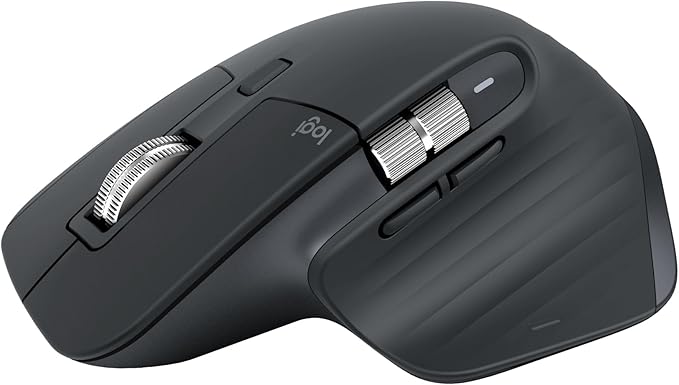


The thumb wheel however isn’t just for switching tabs - that’s just what it does in one of its configurations. In Photoshop I have it mapped to brush size, in Premier Pro it scrolls my time line horizontally and in Lightroom I have it set to zoom in and out of my images.
Underneath the thumb wheel are two buttons (call front button and back button), which I have mapped to copy and paste in all applications and then there is the gestures button, another multifunction area of this mouse. I won’t bore you with all the mappings that I have set up, but having the ability to alt+tab between windows, without actually having to alt+tab is, for a new mouse nerd, awesome.
The LogiOptions+ app is where you can set all of your customisations up, and it’s really easy to do. I like doing this kind of thing and making my tools work for me, but even if this isn’t your kind of thing, it’s really quick and it’s really straightforward.
But the biggest plus for me? I can charge this thing without having to be without my mouse for a couple of hours. The charging is pretty swift (via USB C) and the battery lasts for well over a couple of weeks - I am not a heavy user, everything I am doing is related to either my photography or this website, I’m not using it for gaming, it’s very much studio/office/admin work so granted, the battery isn’t taking much of a hammering.
Compared to the Magic Mouse, this feels like a tool designed for actual productivity rather than aesthetics.
Should You Get One?
If you’ve got the budget — yes.
This is one of those tools that quietly transforms how you work. More speed, less friction, and far fewer interruptions.
Who Should Buy One?
Photographers
Videographers
Editors
If your workflow relies on shortcuts, fast navigation, and switching between apps, this will genuinely improve your efficiency.
If you’re just doing basic admin, it’s probably overkill.
Found this useful?
You can support the blog by buying me a coffee — every bit helps me keep producing free, high-quality content.
Want more like this? Join my mailing list for photography tips, gear reviews, and practical advice designed to help you get better results from your kit.
Click the links to below to read some of my previous blog posts.