My Photography Blog
Welcome to the Chris Kendrick Photography Blog, where I share the stories, challenges and inspirations behind shooting Lake District landscapes and working as a Cumbria-based photographer. Alongside behind-the-scenes reflections from the fells and lakes, you'll also find honest photography gear reviews, covering the cameras, lenses and accessories that genuinely perform in real Lake District conditions. Whether you’re passionate about landscape photography, exploring Cumbria’s scenery, building your kit, or simply curious about the craft, there’s something here for you.
Some posts include affiliate links; thank you if you choose to support the blog through a qualifying purchase. If there’s a topic or piece of gear you’d like me to cover, let me know. Enjoy exploring!
Enjoy!
Using Shutter Speed Technically and Creatively
Shutter speed is one of the most powerful tools in photography. In this guide, I break down how it works, when to use fast or slow settings, and how to use it both technically and creatively. From freezing action to capturing light trails and smooth water, this is a practical introduction to controlling motion in your images.
In this blog I am going to explore another area of the exposure triangle, namely shutter speed. I have already made a post all about the exposure triangle and how it works and there’s also one about why you shouldn’t stress about getting bokeh in your images. There’s even one about how to exposure bracket, but as of yet there, is nothing about shutter speed. That changes now.
I’ve made a quick exposure time calculator for astrophotography - there’s a link at the bottom of the page; bookmark it so you can find it easily again!
TL;DR
Shutter speed controls how motion appears in your images.
Fast shutter speeds freeze action and give sharp, technically accurate results.
Slow shutter speeds introduce motion blur for creative effects like light trails and smooth water.
There are no perfect settings. Use faster speeds for clarity, slower speeds for atmosphere.
Technical VS creative Creative Shutter Speed
When I talk about technical shutter speed, I am talking about the shutter speed that is needed to secure sharp, well exposed images that don’t have any motion blur. Think about for example taking documentary style landscape shots which are a true reflection of what you saw on the day, or commercial product shots where you are trying to show an image at its absolute best or even corporate headshots where if you deliver images which have motion blur in them or are too dark then you’re probably not getting booked again.
These are the types of shots where the images need to be as close to technical perfection as possible. You can combine it with focus stacking, like in the image above to produce sharp, properly exposed images.
On the other hand, we can use shutter speed creatively, and that might be intentional camera movement, capturing light trails, wire wool photography or even creative portraits, where we want to see some of the movement of the subject in our images. This is a slightly different scenario. I would like to explore both of these in this blog, and hopefully give you some ideas to take away to go an experiment with.
What is Shutter Speed?
Shutter speed is one of the three elements of the exposure triangle, alongside aperture and ISO.
It controls how long your camera’s sensor is exposed to light. The longer the shutter is open, the more light hits the sensor and the brighter your image becomes. The shorter the shutter speed, the darker the image.
Balance it with aperture and ISO, and you’ll achieve a properly exposed shot.
Freezing Motion vs Creating Motion Blur
As a general rule, fast shutter speeds freeze motion, and slower shutter speeds create motion blur. Remember though, this is all relative; shooting at 1/100 of a second might freeze some things in sharp focus, but try shooting a formula one car going at full speed, at this shutter speed and you will see that you need something much faster.
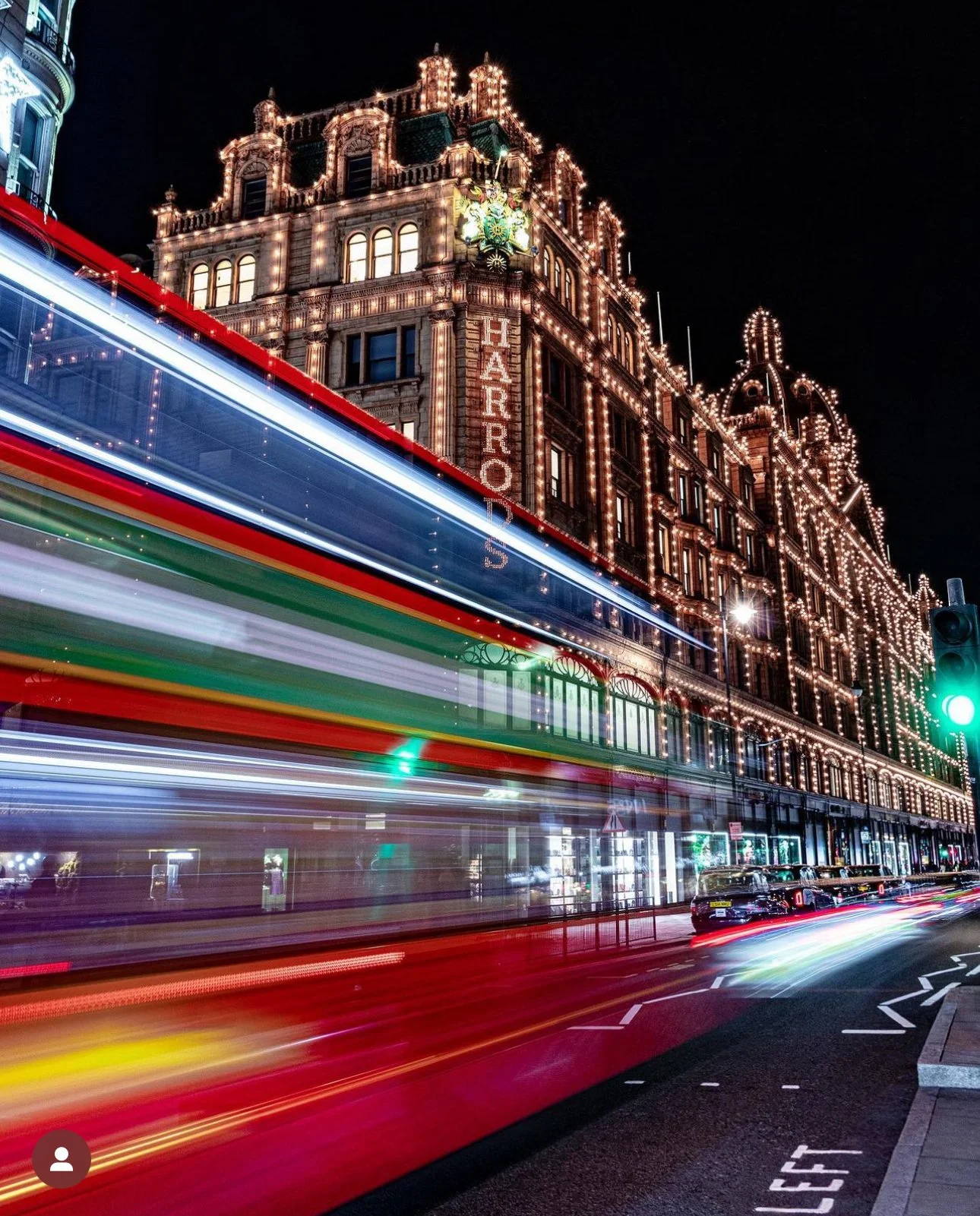
When it comes to slower shutter speeds, it isn’t cut and dried. If for example, you’re aiming for light trails, then 30 seconds will get you some great streaks, but they won’t have any trace of the vehicle, if you want to shoot the classic “blurry bus” then you’ll need a shorter long exposure, usually something around 3 seconds. Intentional camera movement will require various different, longer shutter speeds and you’re going to have to experiment.
There are no best settings (as with all other types of photography), but there are some approximations that will get you in the ball park of where you want to be. And you’ll also need to take into account weather and lighting conditions wherever you are on the world.
There’s a lot of experimentation involved, often with every single shot you take.
Technical Shutter Speed
This is the shutter speed that you need to capture an image which is technically correct, that is to say that it is properly exposed with the right aperture, the right ISO and the correct shutter speed. Sports photography is a good example to use for this - you want to capture the players in focus and they need to be sharp. No one is going to buy photos that are full of motion blur and where you can’t see what the players are doing, let alone who they are.
Another example, could be in landscape photography where you want to capture the scene as it exists in front of you - you want to freeze the clouds, you want to freeze the trees and you want to freeze the motion in water. In this case, you are going to want a faster shutter speed to make sure that everything is look crisp.
It can be handy in some situations to put your camera in shutter priority mode (Canon user, that’s the TV mode on your mode dial, it stands for Time Value), as this gives you full control over the shutter speed and the camera will select the ISO and aperture values for you. You can set the max ISO you want to use in your camera’s settings, but you will need to consult the manual for you specific model of camera for details about how to do this. This gives you less to think about and you can then focus on the things you need to do, such as getting the right shutter speed to capture the image that you want.
The above filters are ones which I recommend, I personally use K&F concept as they are at the best price point for me. If you're just starting out with filters then buying one to fit your largest lens and pairing them with the steup and down rings can be a money saver If you choose to purchase through these links, I may earn a small commission at no extra cost to you — it helps support the site and keeps content like this free.
Creative Shutter Speed
This is what I call it when you are using your shutter speed to directly and intentionally affect the image that you are producing. This where it gets fun!
There are tons of applications for this type of photography and these range from light trails, to bus trails, smoothing out water and capturing motion in moving water to wire wool photography of capturing the movement in the clouds.
Light trails and bus trails were two of my staples when I lived in London and I got really good at dialling in the settings.
Lets start with light trails…
You going to need to find a good location - this is key. Symmetry works well, as do roads that snake through the landscape as both of these create interest in your images. London was great for this, places like Holborn Underpass work really well for this. Another good location is motorway bridges (stay safe and don’t drop anything) as you’ve got traffic both sides of your image.
You’ll find that exposure times of around 10seconds plus work for this kind of shot and will give you lovely long light trails, but if you’re shooting a really long stretch of road then you will want a longer shutter speed otherwise the trails just stop abruptly and that doesn’t produce attractive images.
Bus Trails (also works with other kinds of vehicles)
I call them bus trails as when I lived in London, the busses had lights with a really cool colour temperature and they looked great in photos against the red of the busses.
Composition as ever is key, I used to find the shooting just prior to the vehicle entering the frame works well, and you’ll want an exposure time of around 3 seconds (but this is going to depend on the speed of the vehicle). This will leave you with some fab looking motion blur that you can have ton of fun with in post!
Smoothing Out Water…
Sometimes when we arrive at a landscape photography location, we find that the body of water we wanted to shoot is moving more than we wanted it to be because of the breeze - a long shutter speed will help you to smooth this out, but it does have a very specific effect and you’ll have to decide whether you want or if you want to come back another day.
One situation I have always works well for this technique is when you’re shooting the sea, especially if the conditions are moody and you’re after a minimalist look to your images - high key black and white edit anyone?
The longer your exposure time, the smoother the outcome - experiment, find out what works!
Don’t fall into the trap of thinking that this technique is going to allow you to preserve reflections that are being disrupted by motion in the water - it won’t! If the water is moving then so is the reflection - long exposures can help you to work with nature, but they won’t allow you to beat it!
Capturing Movement in Moving Water
When I am thinking about writing this, I have waterfalls at the forefront of my mind. Slow shutters can work really well with waterfall shots, but you have to be careful, it’s really easy to overcook these and you end up with water that looks like milk! Less is more here. If you want the full “milky” effect than fire out exposures at 30 seconds and you’re there in a (very long) heartbeat).
You’re going to have to be patient to get the shot you want, much like with anything that is moving, the optimum shutter speed is going to be determined by its speed. If you’re visiting a waterfall location there is going to be much more water falling than after a dry spell so you need to factor this into both your planning and your execution when you are out in the field.
Capturing Movement in Clouds.
This is great way to show the passage of time in an image. Using a long exposure on your landscape photography to shoe movement in clouds creates (for me at least), a much different feeling and effect in your photos to that which you get when you use long exposure to smooth out water.
Different exposure times will give you different results and the wind direction has an impact too. I like shots where the wind is blowing the clouds away from me (as though the wind is blowing from over my shoulder) as this creates a real depth to your image!
Intentional Camera Movement
This is exactly what it sounds like. For the initiated, this is a technique which uses longer shutter speeds, but often nothing much more than a second. You press the shutter, intentionally move the camera to create motion blur, rinse and repeat.
There are two parts to the word intentional in this context.
There is the intention to move the camera i.e. you mean to do it - it isn’t accidental and you have to be intentional when you make the movement, that is to say that you need to do it with purpose.
If you’re looking for dreamlike and/or abstract then trying some ICM could be for you!
Astro Photography
Whatever it is, the way you tell your story online can make all the difference.
I am no astrophotographer. Don’t get me wrong, it’s not because I don’t like doing it, it’s just that I don’t practice it enough, nor do I have the specialised equipment that you need to get some of the really dramatic and awe-inspiring shots that can be created. However, there is a great rule of thumb called “The 500 rule”.
This is a calculation that you can do quite quickly and it will work out the maximum shutter speed you can use to capture sharp stars without any star trails (these are created by the Earth’s rotation) so that you have clean shots of whatever it is you are trying to capture.
The 500 rule for astrophotography explained:
The rule is this… 500 ÷ Focal length = max shutter speed in seconds. You then need to adjust for crop sensors/micro four thirds cameras so the equation becomes 500 ÷ (Focal length x crop factor) = max shutter speed in seconds.
To help you with this, I have created this free astrophotography shutter speed calculator which allows you to plug in your settings and it will spit out the correct settings, enjoy!
Night Photography Shutter Calculator
In Conclusion
Shutter speed is one of the most powerful creative tools in photography. Whether you’re aiming for sharp, technically perfect images or experimenting with motion and atmosphere, understanding how to control it will completely change the way you shoot.
The best way to learn is simple: get out there and experiment.
Thanks for reading, I hope you found this useful/insightful! If you’d like to be the first hear about new blogs and reviews and to keep up to date with what I am doing and see my latest work, please consider signing up to the mailing list via the contact page.
If you’d like to support the blog and help me keep producing Lake District photography content, honest gear reviews and regular website updates, you can do so via my Buy Me a Coffee page. Keeping everything running smoothly takes time, and your support makes a real difference. Thank you.
Image Credits - Milky Way Shot Pars Sahin @byadoniaa on Unsplash.com
Check out Some of My Previous Blog Posts Below:
Focus Stacking: How to Get Sharp Images in Landscape Photography
Focus stacking is a powerful technique that allows photographers to achieve sharp focus throughout an entire image, from foreground to background. In this beginner-friendly tutorial, you will learn what focus stacking is, when to use it, how to shoot the required images in the field, and how to blend them together in post-processing for professional results. Ideal for landscape and macro photographers looking to improve image sharpness and detail.
Sharpness. It’s a hot topic in photography and it’s never going to of away. We all pixel peep whether we admit to it or not, and not just for our own photos.
However, there are limitations to our equipment, even the very best, most expensive lenses can only achieve so much sharpness - you can’t beat physics, you just have to adapt to it. You can come close. Coming close is expensive, and expensive will only get you most of the way. Sometimes we just have to work with what we’ve got and that usually involves using our computer and some editing software.
For this one, we’re going to be using Photoshop, as it’s the easiest and quickest way for us to get the results we want.
What is Focus Stacking?
A good starting point for this would be to look at my blog on exposure blending if you’re not sure about it and then come back and finish this off. If you’re already au-fait with exposure blending/stacking then read on!
Focus stacking helps us to ‘remove’ some of the limitations of our lenses. Even at their sharpest f/stop, there are parts of the image (often the corners), that aren’t as sharp as we would like them to be. With focus stacking, we can take several different exposures of the same subject, with different focus points, usually working from the front of the image to the back and then we can blend them together in Photoshop which creates one image which is sharp across its whole area.
How Do You Focus Stack?
The first thing you need to do is to take your images. I am going to use an example which I have taken in the studio, for the simple reason that this is the place that I have the most control over as much of the process as possible. I’m going to be shooting tethered using capture one, but the process you will go through will be exactly the same, be it in the studio or out in the field. The major difference is that when you/I are working out in the field, instead of being in the warmth of the studio and working on a nice big monitor, we’re often out in poor conditions and working on the ‘tiny’ screen on the back of the camera.
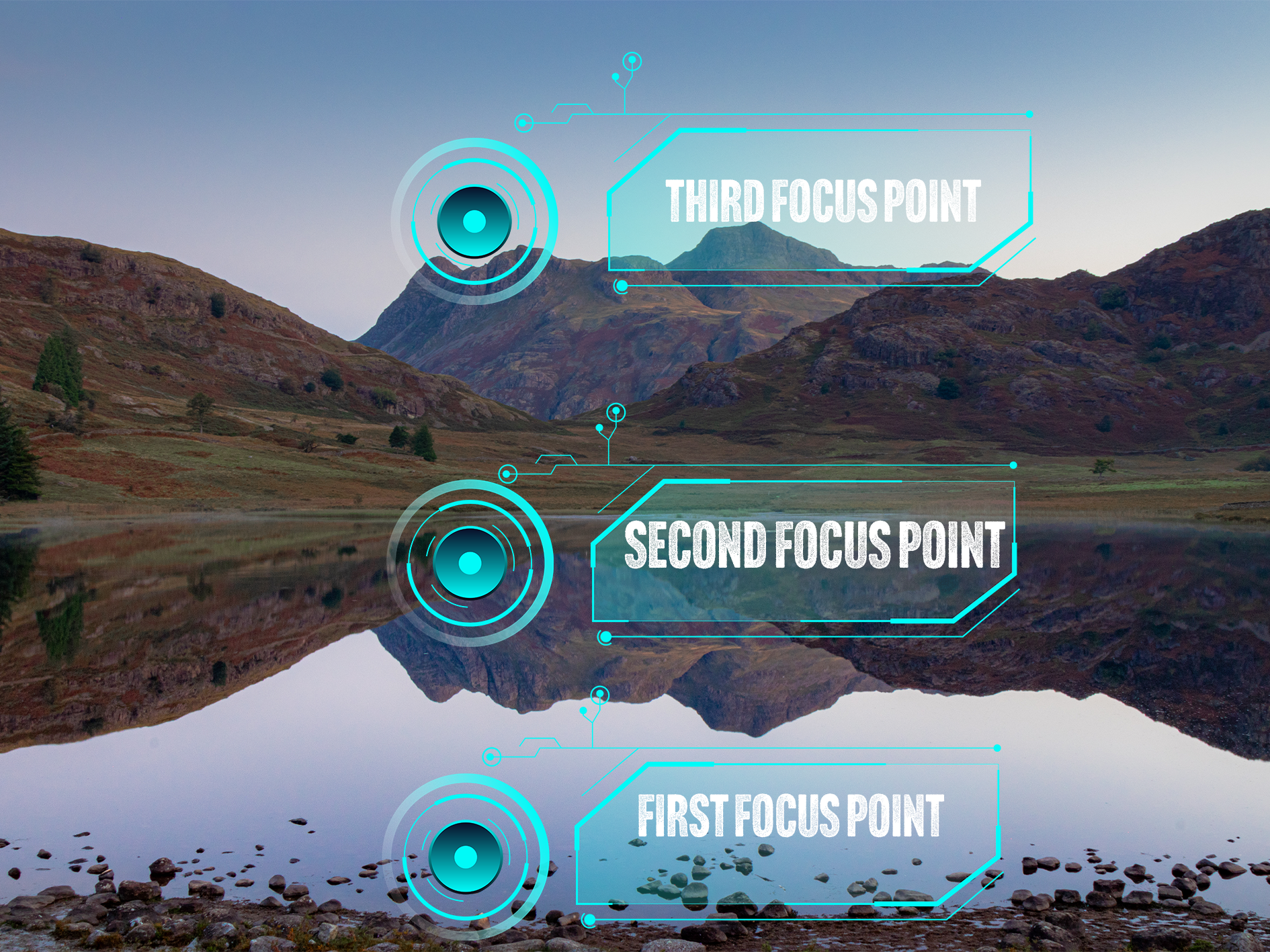
Essentially, what we’re going to do is take at least 3 different exposures. In the first image, we are going to make sure that our foreground, or the front of our object is in focus, in the second image, we are going to focus on the mid ground and then finally, we are going to focus on the back of the image; this will either be the back of your object in the studio, or on infinity if you are out in the field. I have tried to visualise this for you in the image below.
This image shows where your (minimum) 3 focus points will be when you are shooting images for an exposure stack.
How many shots you need is going to be influenced by what you are shooting and what you are shooting on, what f/stop you’re at and if there is any movement in your scene. Three exposures is a good rule of thumb for this type of photography, if you take too many images, this can start to complicate things in post processing and your image can end up looking strange, have weird artefacts in it when your exposures are blended or simply, it just won’t work!
The other thing to remember is that you need to keep your settings locked in. If you start to change the settings on your camera between each exposure, this can cause issues and slow down the process.
Finally, you need to (99.9%) of the time, do this on a tripod. You want your exposures to line up exactly between shots, if they don’t, guess what… more complications!
So you’re set up, you’ve got your shot framed and you’re ready to start shooting. The next phase of this is going to be dependent on the camera you have. A lot of newer Canon camera’s have a focus stacking setting built into them. You will need to consult your camera’s manual for instructions on how to do this, but you can tell it how many images you want in the stack and how much you want the focus to shift between each image. The other way of doing it, and the way I am going to describe in this blog (because my camera doesn’t have the focus stack function!) is manually, using either manual or autofocus.
This is fairly straightforward.
1) Frame up your shot and select your settings.
2) Focus on the foreground by either twisting your focus ring, or tapping the screen to select a focus area and half pressing the shutter button. Check the focus is sharp and capture your image.
3) Repeat step 2 for the midground.
4) Repeat step 2 for infinity/background.
I always find it useful to grab an exposure which has my hand in front of the lens after I have completed each ‘stack’.
You can take as many stacks as you like whilst you’re out and about, but keeping them organised whilst you are working and before you get into post will make your life a lot easier in the edit.
How to Create a Focus Stack in Lightroom and Photoshop.
I have shared a video below which explains this process in full, but the first thing you are going to want to do is import your images into Lightroom.
Once they are in Lightroom, edit your first image and get it looking the way you want it. Once you have done this, you want to copy the settings from you first image to the other two in you stack, so that they all have the same adjustments applied to them. I usually just make some global adjustments at this stage and do anything local on the image I get out of Photoshop. You can see this process in the video below. You can make your adjustments in Camera Raw in Photoshop, but I find the process of copy and pasting the adjustments in Lightroom much easier.
Once you’ve done this, you need to select your three images and then right click and ‘open as layers in Photoshop’. When you’ve done this, you can move on to the next stage.
Now your images are in Photoshop, the process is pretty straightforward; you’re going to shift click to select all three images, the in the edit menu, we’re going to select “auto align layers”. This will make sure that our images are neatly stacked on top of each other. Leave the ‘Auto’ option checked and click OK.
Once this has completed, make sure that the three layers are still selected, go back into the ‘edit’ menu and select “auto blend layers”. Make sure that “stack” is selected and then I always keep “seamless tones and colours” and “Content aware fill transparent areas” are checked. The latter will fill any transparent areas (usually around the edges) that have been created when your images were aligned.
Now that Photoshop has done it’s thing you will see that it has created masks on each of your layers, and if it’s worked well, you should see that the masks are broadly letting the focussed areas of each shot show through. If you need to fine tune these masks, you can do this using either a white or black brush and painting on the respective mask.
The final step is to check that you are happy with what you have, that it’s sharp where you want it to be, and that’s the process done!
All you need to do now is hit save, and if everything is working well, you should see it appear back in Lightroom as a .tiff file that you can now make some local edits on and get it looking exactly how you want it!
I have made a video of this whole process below, so you can see each step and hear some commentary that I hope you’re able to follow along with!
Step By Step Focus Stacking Video Tutorial
Check out my YouTube video on focus stacking - please head over to the channel and subscribe!
Original Images:
I set this up on the studio against a yellow backdrop and one light source (just a video light for this for the sake of speed), this is just three props I found amongst some old props in the studio - a lego mini-figure, a pocket watch and a Funko figure. I set these up in a line extending away from the camera. These images were shot at f/4, just to force the depth of field to clearly illustrate what I am trying to demonstrate. You should be able to see the three focus points by looking at which part of the image in focus, you should be able to see each subject in sharp focus as the focus point moves towards the back of the image.
Whilst I have done this in the studio to illustrate it, the process in the field is exactly the same. The only thing you might find is that when you’re not in a controlled environment, you’re much more likely to have changes in light and the position of your camera to deal with.
After following the process outlined above, all three images are combined to produce the final, stacked and fully focussed image you see below:
I hope that you have found this useful, I am trying to put some more of this type of content together and will eventually get them uploaded to my Chris Kendrick Photography YouTube Channel so you can digest them at your leisure.
If you have found this useful, I’d be grateful if you would like to support the blog and help me keep producing Lake District photography content, honest gear reviews and regular website updates, you can do so via my Buy Me a Coffee page. Keeping everything running smoothly takes time, and your support makes a real difference. Thank you.