My Photography Blog

Welcome to the Chris Kendrick Photography Blog, where I share the stories, challenges and inspirations behind shooting Lake District landscapes and working as a Cumbria-based photographer. Alongside behind-the-scenes reflections from the fells and lakes, you'll also find honest photography gear reviews, covering the cameras, lenses and accessories that genuinely perform in real Lake District conditions. Whether you’re passionate about landscape photography, exploring Cumbria’s scenery, building your kit, or simply curious about the craft, there’s something here for you.

Some posts include affiliate links; thank you if you choose to support the blog through a qualifying purchase. If there’s a topic or piece of gear you’d like me to cover, let me know. Enjoy exploring!

Enjoy!
What Are The Best Camera Settings for Landscape Photography?

When photographers ask “what are the best settings for landscape photography?”, they’re often looking for a simple checklist. The reality is that there’s no single set of perfect settings that works for every landscape scene. Light, weather, subject movement, time of day, and creative intent all influence the choices we make behind the camera.

In this guide, I explain why fixed “best settings” don’t really exist, and instead break down the decision-making process photographers use when choosing aperture, shutter speed, ISO, and focus. By understanding how these elements interact with the scene in front of you, you’ll be able to confidently select the right settings for any landscape, rather than relying on guesswork or presets.
This is a question I get asked a lot, and I mean A LOT. Not just about landscape photography, but about all sorts of different photography - what are the best settings for portraits/ICM/product/wildlife… the list goes on.

The bad news for some people is that there is no ‘best’ settings for any of these types of photography. The best settings for the photo that you are taking are the ones that you need to be able to take the photo you want to take.

Let me unpack this a little…

For some situations, there are preferred settings. In a landscape shot, I am going to want use the sharpest part of my lens, and for the lenses that I have, that’s usually somewhere around the f/8 mark.

This is going, to some extent, dictate the rest of my settings as I am making the aperture smaller; other things are going to need to change in order to compensate. If you’re new to photography, then reading my blog about the exposure triangle, is going to help you to really understand what I am talking about in this entry.

Once I have set my aperture, I have a number of things I want to consider… do I want to freeze motion or do I want motion blur? Do I need to inject a ton of ISO into the image to get my desired exposure length? Does the ISO value I choose mean that I am going to be adding a load of noise/grain into my image that is going to ruin it?

Even though I want to use the f/8 aperture, this might not be possible and I may need to make some compromises.

It may even mean that to get my desired level of sharpness across the whole image, I need to consider focus stacking.

There’s a lot going on in just this one scenario.

Thinking again about the original question, “what are the best settings for landscape photography?”, we then need to remember that as landscape photographers, everything we do is at the mercy of that staple of British conversation, the weather. As a landscape photographer in The Lake District, I know only too well the perils of the changeable Lake District weather and understand that at certain times in the year, it isn’t uncommon to experience all four seasons in one day! However, the most common thing you are going to come across is changing light, no matter where you are.

Sometimes the light will be bright, you’ve got your camera settings dialled in and made your image. You want to take another couple of images at the same location, or of the same subject, but the light has changed, the clouds have positioned themselves firmly in front of the sun and everything that you have just done correctly to nail the first exposure, now needs to change. This is normal and for me, it’s one of the challenges that makes this pursuit so much fun!

But I’m Not a Landscape Photographer!

To be quite frank, this doesn’t matter. What I have just said can apply to all manner of photography genres, particularly those where you have little-to-no control over what the light is doing, because you are shooting outside and are at the mercy of Mother Nature.

To give another example…

I used to live in London and was used to shooting in low light - night photography was a real staple for me, as were shots of “bus trails” and light trails. For a time, I was obsessed with taking cityscape images, with long exposure times to get either light trails or capture the motion blur of a bus that was driving through my scene.

After much experimentation, I figured out that for me, on my camera with my lenses, the optimum exposure time for a perfectly (in my opinion!) blurry bus was around 0.3 seconds. Notice that I said “around” in the last sentence? This is because it wasn’t always 0.3 seconds, there are a lot variables at play, not least the speed of the bus that was driving through your scene. If it was going too fast for my settings I wouldn’t get what I wanted. If it was going to slowly for my settings, it wouldn’t make it out of my scene and I would end up with something that I didn’t want.

What about portraits?

Surely for portraits, what you need is a fast lens and then just to shoot everything at f/1.8 also that you get good bokeh? Not in my experience.

Bokeh is great, we all love the way it looks, be that light orbs in the background of our images, or a blurry background that makes your subject ‘pop’ and creates some separation from background.

The issue is the focus plane. I try to imagine the focus plane of my image as an invisible entity that stretches from the front to the back of my scene. The higher my f number, the deeper the depth of field and the more of the image will be in focus.

But when it comes to shooting portraits, you want to be sure that all of your subject is in focus. I have found in my experience, the shallower the depth of field, the less of my subject is in focus and by the time I have looked beyond the focus of someone’s nose, I am starting to see a fall off in sharpness and by the time I have moved along that invisible plain to their ears, I am really not seeing as much sharpness as I should.

In the portrait scenario, your settings are not only going to be dictated to you by the amount of light that you have available, but also by your distance from your subject, and further more, your subject’s distance from the background. You might need to adjust your settings, your positioning and your subject’s positioning to make sure you are getting the level of focus you want and the correct exposure that you need.

If you’re doing headshots in a controlled lighting environment, against a backdrop and you can have your subjects stood on a mark, then this is going to be a little bit easier to figure out and to maintain your settings.

But if, for example, you are trying to tell a story in your images, then you are going to want completely different settings. Let’s say for example you are taking a series of portraits of people that tell us about the job they do and you are taking a portrait of a fisherman who works on a boat. You’re shooting on location at a harbour and his boat is moored up.

In this setting, you could set your aperture to f/1.2 and have a really buttery-smooth, bokeh’d background. Or… you could stop down your aperture ring to give you more of the background in focus so that you can see the harbour and the boat behind the fishermen. All of a sudden you have gone from a photograph of man who looks and dresses a bit like a fisherman, to a man who is a fisherman, with his workplace and working environment behind him to really sell the concept and to help to tell the story. Context, sometimes, is everything.

How About In The Studio?

Again, it’s a similar story here, but you do have much more control. This is because in a studio, you have full control over the lights - if you have a decent set of lights/strobes/flashes etc then you can control the brightness/intensity of the light, how soft or hard the light is (with the use of modifiers), how long it lasts for, where it is coming from and its distance from your subject, the way the light is diffused, the colour of the light… the list could go on.

What this means is that you could set your camera up and change the lighting settings or you could adjust your camera to the lighting scenario depending on what it is you are going for, but generally, if you’re changing one setting, you are going to need change something else.

In the studio, there is not a single set of perfect settings, the settings you need are going to be dependent on the look you are going for, what you are shooting (shape, size, etc) and how you need to present the final images to the client.

We are however, always looking for an image that is sharp, so our aperture is likely to be the overriding factor in our decision making here.

There are preferred settings…

… but there are no best settings!

Your preferred settings are the ones that you prefer. It doesn’t mean that they are the best ones - they might not be someone else’s. Think of it like this: If there were a set of best settings for every scenario, someone would have written the book, we’d all have a copy and we’d all be shooting the same images in the same way.

We’d also all be reading the book and thinking to ourselves “well they’re not the best settings for that situation, because what about that photo of x that I took at y”.

There’d be umpteen YouTube videos on the topic of “why I disagree with the best settings manual and what I do instead”. You see my point? These are personal, artistic choices/decisions based on an infinite number of possible scenarios with an infinite number of desired outcomes.

As you have probably gathered by now, there isn’t one single set of best settings for each of the situations you are looking to shoot. The best settings are dictated by where you are, the time of the day, the weather, the kit that you are shooting with and what your final intentions are.

Some of this is also going to be dictated by personal taste, especially when it comes to the creative aspects of your own work (if you’re doing client work then a big part of the creativity is going to be dictated to you, but remember that you’ve been hired for the way that you shoot, so your creativity still plays a role).

The best way to ensure that you can get the correct settings for your intended outcome is to practice, learn your camera and what it can do, what it is capable of and how to make it do what you want it to and how to programme the settings effectively. Spend some time learning about lighting, experiment and always have a project on the go so that you’re actively creating.

Thanks for reading, I hope you found this useful/insightful! If you’d like to be the first hear about new blogs and reviews and to keep up to date with what I am doing and see my latest work, please consider spending a few moments signing up to my newsletter.

If you’d like to support the blog and help me keep producing Lake District photography content, honest gear reviews and regular website updates, you can do so via my Buy Me a Coffee page. Keeping everything running smoothly takes time, and your support makes a real difference. Thank you.

Read More

Focus Stacking: How to Get Sharp Images in Landscape Photography

Focus stacking is a powerful technique that allows photographers to achieve sharp focus throughout an entire image, from foreground to background. In this beginner-friendly tutorial, you will learn what focus stacking is, when to use it, how to shoot the required images in the field, and how to blend them together in post-processing for professional results. Ideal for landscape and macro photographers looking to improve image sharpness and detail.
Sharpness. It’s a hot topic in photography and it’s never going to of away. We all pixel peep whether we admit to it or not, and not just for our own photos.

However, there are limitations to our equipment, even the very best, most expensive lenses can only achieve so much sharpness - you can’t beat physics, you just have to adapt to it. You can come close. Coming close is expensive, and expensive will only get you most of the way. Sometimes we just have to work with what we’ve got and that usually involves using our computer and some editing software.

For this one, we’re going to be using Photoshop, as it’s the easiest and quickest way for us to get the results we want.

What is Focus Stacking?

A good starting point for this would be to look at my blog on exposure blending if you’re not sure about it and then come back and finish this off. If you’re already au-fait with exposure blending/stacking then read on!

Focus stacking helps us to ‘remove’ some of the limitations of our lenses. Even at their sharpest f/stop, there are parts of the image (often the corners), that aren’t as sharp as we would like them to be. With focus stacking, we can take several different exposures of the same subject, with different focus points, usually working from the front of the image to the back and then we can blend them together in Photoshop which creates one image which is sharp across its whole area.

How Do You Focus Stack?

The first thing you need to do is to take your images. I am going to use an example which I have taken in the studio, for the simple reason that this is the place that I have the most control over as much of the process as possible. I’m going to be shooting tethered using capture one, but the process you will go through will be exactly the same, be it in the studio or out in the field. The major difference is that when you/I are working out in the field, instead of being in the warmth of the studio and working on a nice big monitor, we’re often out in poor conditions and working on the ‘tiny’ screen on the back of the camera.

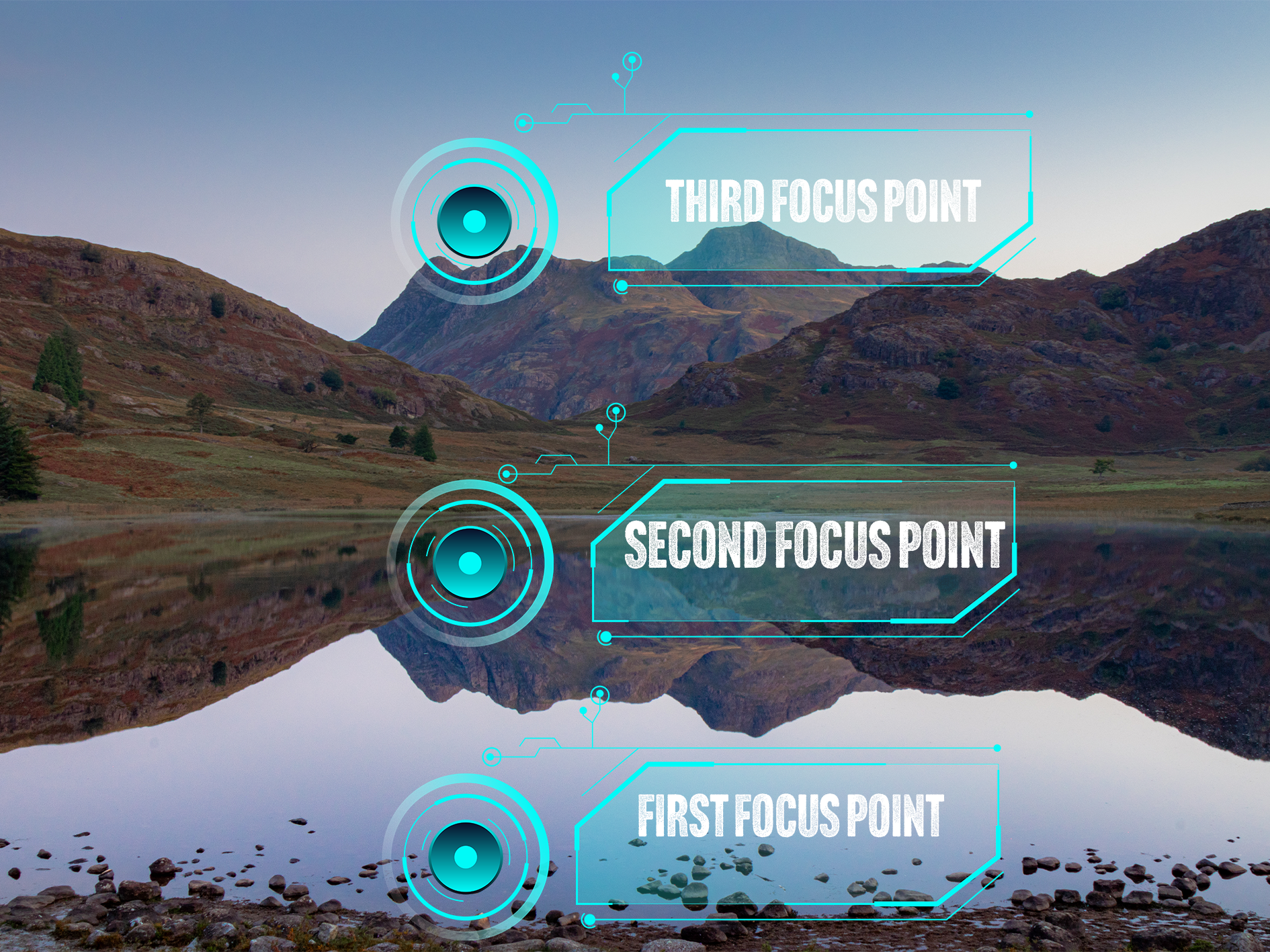
Essentially, what we’re going to do is take at least 3 different exposures. In the first image, we are going to make sure that our foreground, or the front of our object is in focus, in the second image, we are going to focus on the mid ground and then finally, we are going to focus on the back of the image; this will either be the back of your object in the studio, or on infinity if you are out in the field. I have tried to visualise this for you in the image below.

This image shows where your (minimum) 3 focus points will be when you are shooting images for an exposure stack.

How many shots you need is going to be influenced by what you are shooting and what you are shooting on, what f/stop you’re at and if there is any movement in your scene. Three exposures is a good rule of thumb for this type of photography, if you take too many images, this can start to complicate things in post processing and your image can end up looking strange, have weird artefacts in it when your exposures are blended or simply, it just won’t work!

The other thing to remember is that you need to keep your settings locked in. If you start to change the settings on your camera between each exposure, this can cause issues and slow down the process.

Finally, you need to (99.9%) of the time, do this on a tripod. You want your exposures to line up exactly between shots, if they don’t, guess what… more complications!

So you’re set up, you’ve got your shot framed and you’re ready to start shooting. The next phase of this is going to be dependent on the camera you have. A lot of newer Canon camera’s have a focus stacking setting built into them. You will need to consult your camera’s manual for instructions on how to do this, but you can tell it how many images you want in the stack and how much you want the focus to shift between each image. The other way of doing it, and the way I am going to describe in this blog (because my camera doesn’t have the focus stack function!) is manually, using either manual or autofocus.

This is fairly straightforward.

1) Frame up your shot and select your settings.

2) Focus on the foreground by either twisting your focus ring, or tapping the screen to select a focus area and half pressing the shutter button. Check the focus is sharp and capture your image.

3) Repeat step 2 for the midground.

4) Repeat step 2 for infinity/background.

I always find it useful to grab an exposure which has my hand in front of the lens after I have completed each ‘stack’.

You can take as many stacks as you like whilst you’re out and about, but keeping them organised whilst you are working and before you get into post will make your life a lot easier in the edit.

How to Create a Focus Stack in Lightroom and Photoshop.

I have shared a video below which explains this process in full, but the first thing you are going to want to do is import your images into Lightroom.

Once they are in Lightroom, edit your first image and get it looking the way you want it. Once you have done this, you want to copy the settings from you first image to the other two in you stack, so that they all have the same adjustments applied to them. I usually just make some global adjustments at this stage and do anything local on the image I get out of Photoshop. You can see this process in the video below. You can make your adjustments in Camera Raw in Photoshop, but I find the process of copy and pasting the adjustments in Lightroom much easier.

Once you’ve done this, you need to select your three images and then right click and ‘open as layers in Photoshop’. When you’ve done this, you can move on to the next stage.

Now your images are in Photoshop, the process is pretty straightforward; you’re going to shift click to select all three images, the in the edit menu, we’re going to select “auto align layers”. This will make sure that our images are neatly stacked on top of each other. Leave the ‘Auto’ option checked and click OK.

Once this has completed, make sure that the three layers are still selected, go back into the ‘edit’ menu and select “auto blend layers”. Make sure that “stack” is selected and then I always keep “seamless tones and colours” and “Content aware fill transparent areas” are checked. The latter will fill any transparent areas (usually around the edges) that have been created when your images were aligned.

Now that Photoshop has done it’s thing you will see that it has created masks on each of your layers, and if it’s worked well, you should see that the masks are broadly letting the focussed areas of each shot show through. If you need to fine tune these masks, you can do this using either a white or black brush and painting on the respective mask.

The final step is to check that you are happy with what you have, that it’s sharp where you want it to be, and that’s the process done!

All you need to do now is hit save, and if everything is working well, you should see it appear back in Lightroom as a .tiff file that you can now make some local edits on and get it looking exactly how you want it!

I have made a video of this whole process below, so you can see each step and hear some commentary that I hope you’re able to follow along with!

Step By Step Focus Stacking Video Tutorial

Check out my YouTube video on focus stacking - please head over to the channel and subscribe!

Original Images:

I set this up on the studio against a yellow backdrop and one light source (just a video light for this for the sake of speed), this is just three props I found amongst some old props in the studio - a lego mini-figure, a pocket watch and a Funko figure. I set these up in a line extending away from the camera. These images were shot at f/4, just to force the depth of field to clearly illustrate what I am trying to demonstrate. You should be able to see the three focus points by looking at which part of the image in focus, you should be able to see each subject in sharp focus as the focus point moves towards the back of the image.

Whilst I have done this in the studio to illustrate it, the process in the field is exactly the same. The only thing you might find is that when you’re not in a controlled environment, you’re much more likely to have changes in light and the position of your camera to deal with.

After following the process outlined above, all three images are combined to produce the final, stacked and fully focussed image you see below:

I hope that you have found this useful, I am trying to put some more of this type of content together and will eventually get them uploaded to my Chris Kendrick Photography YouTube Channel so you can digest them at your leisure.

If you have found this useful, I’d be grateful if you would like to support the blog and help me keep producing Lake District photography content, honest gear reviews and regular website updates, you can do so via my Buy Me a Coffee page. Keeping everything running smoothly takes time, and your support makes a real difference. Thank you.

Check out some more of my latest blog posts below…

Read More
gear review, photography gear review, godox Chris Kendrick gear review, photography gear review, godox Chris Kendrick

Gear Review: Godox X3 Pro Wireless Touchscreen TTL Flash Trigger.

The Godox X3 Pro is a compact, touchscreen flash trigger designed for Canon photographers who want fast, reliable control over off-camera lighting. In this review, I take a practical look at how the X3 Pro performs in real-world shooting, covering its radio triggering reliability, touchscreen workflow, TTL and High-Speed Sync support, and how it fits into a modern Godox lighting setup. If you’re considering upgrading your flash trigger or moving to a cleaner, more portable lighting workflow, this Godox X3 Pro review breaks down who it’s for, how it performs, and whether it’s worth adding to your kit.

Ahhh, flash triggers! For years (for me at least) these have been unnecessarily difficult to use bits of kit with complicated menus, too many buttons and some of the least intuitive things I have ever had in my photography set-up.

The Godox X3 Pro-C was launched in late 2025, with initial availability starting in September/October 2025 and changed that! It is something that I have been wishing someone would make for a number of years and finally something has come along that ticked a lot of the boxes I was hoping for.

I’ve had a number of different flashes and I still own some of them. One of the first sets was some Neewer off-camera flashes (the catchily titled Neewer NW-562 E-TTL Flash Speedlite), which came with their own triggers and a manual which contained some literal translations which were largely unhelpful. They were a lot of faffing, but once I got some settings dialled in for the transmitter and the receivers, I didn’t change them. I could just about work with the plethora of buttons and dials on the flash to change things like the output power and the zoom, and I did find it handy being able to reposition them. I still have them as they make useful lights that I can hide in scenes to light them more creatively.

I eventually upgraded to some more powerful strobes, this time from Godox and went for the Godox SK400III, which I paired with Godox XPRO-C TTL trigger. This was a real step-up from the previous trigger as now I could set up groups and store some different settings. Again however, I found this really complicated to use. The old style LCD screen was, I found, very confusing, difficult to use and to be quite honest, a bit of a pain. It did however give me some more flexibility and allowed me to do a little bit more. When I say ‘allowed’, what I mean is that I could control the strobes from the trigger rather than having to go and off fiddle with two set of buttons on two different flashes.

More recently, I have taken delivery of the Godox X3 Pro C Wireless Touchscreen TTL Flash Trigger. Yep, you guessed it, I got in the Black Friday sale last year, and I have had a couple of months to play with it before giving you my thoughts. One of my overriding thoughts is that they need to come up with some better names for these things!

This blog contains Amazon affiliate links and I may receive a small kick back if you make a qualifying purchase after you have clicked one of these links. This is a great way to support the blog, so a massive thank you goes to you if you choose to make a purchase, all of the money I make from this goes back into helping me to create reviews for the blog, it’t not a huge amount, but every little helps!

First Impressions:

This is much smaller than previous triggers that I have owned, yet you don’t lose any of the screen real estate that you want with a piece of gear like this. It’s light, which is a real bonus when you’re sticking it on the top of your camera via the hot shoe. One of the other things I like about it is that it has a built in rechargeable batter - HOORAY - no more faffing about with AA batteries which cost a fortune or rechargeable ones that never seem to last very long. The battery is rechargeable via a USB C cable which comes supplied.

It’s a lovely little object to hold, the plastics feel solid and the branding is fairly tame which means it looks quite subtle.

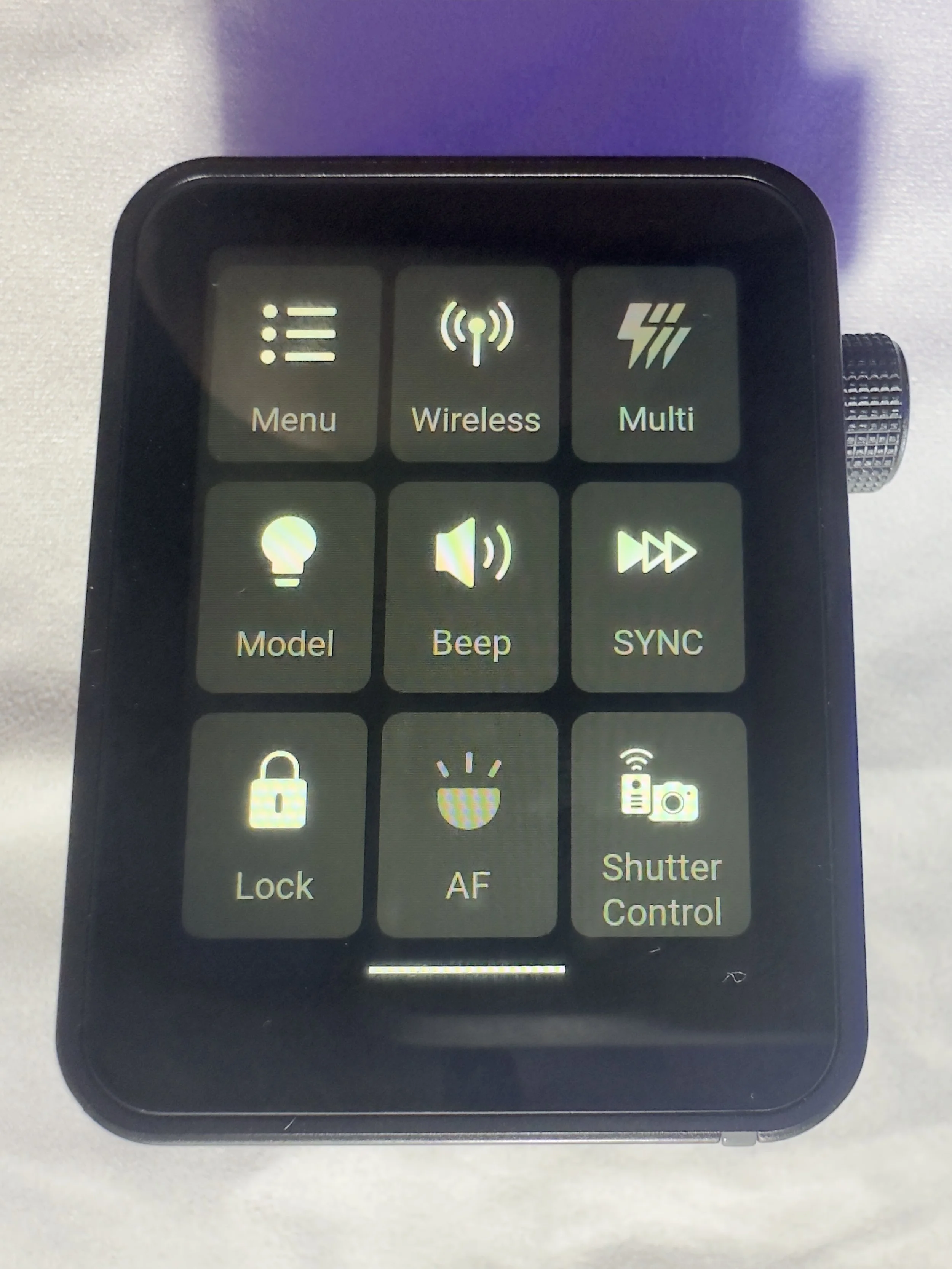
The touchscreen is bright and responsive. It’s also big enough that you’re not forever bumping icons you didn’t mean to and it’s not so sensitive that you’re accidentally changing your settings by just brushing against it.

There are 2 buttons on the right hand side, which give solid feedback when your press them (one of these will test fire the flash and the other is the power/menu button). Finally, on the same side, you have a multifunction wheel, which you can turn to navigate the menus and press to make selections, it has a reassuring click which lets you know you’ve made a selection. This might be handy if you’re working somewhere cold and are wearing gloves, or if you struggle to use your hands to make the changes via the touchscreen.

On the front of the unit there is an autofocus assist beam and at the bottom of it there is mechanical button which retracts a pin on the hot shoe to enable you to release it from the camera when you’re ready to pack down.

It came with about 60% charge already in the battery and to charge it to full took about 45 minutes. I don’t know what the full battery life is, but it’s been enough to get me through a full day’s shooting.

My Experience with The Trigger

I have really enjoyed using it so far. Once I had everything set up (which took no more than a few minutes after I had watched some YouTube videos), I was ready to go and shooting. I had someone booked in for some headshots not long after I took delivery of it and it got me through the whole session with no issues (I did have the old one on standby just incase I ran into any issues), I was able to make range of adjustments which synced to the strobes with no issue.

One thing I really like is that you can scan the 2.4ghz frequencies and the trigger will tell you which channels are the clearest ones for use in the environment you are, and then you can set this on the strobes and the trigger. I use each of my flashes in its own group and I don’t bother with the ID numbers as I am not often working in an environment which requires me to do this. I have however, messed around with creating different groups and using ID numbers for the purpose of this review, and have found that it’s a fairly straightforward process.

There is a slight lag from when you make changes on the trigger to them registering on the flash, whilst this hasn't been an issue for me, it’s something worth knowing. We're talking about delay of less than a second, but I know there are people who aren’t going to be into this.

What other features does it have?

One little ‘'bonus’ feature of this unit is that you can also use it as an intervalometer, but you will need to connect the trigger to the camera with 2.5mm TRS cable (male to male). These are less than a tenner for two if you click the link I have just posted, but a lot of you might find that you already have one of these knocking around at home somewhere, especially if you have purchased flash gear before.

One of the big plusses, for me at least, of this trigger is that it is a radio trigger so this does away with the need for line of sight to enable you to trigger the flash, which gives you some more flexibility on set/location and it saves the need for the use of optical slaves.

Switching between TTL and manual flash is straightforward, which is especially useful when working in changing light conditions.

The updatable firmware is also a huge bonus for lighting setups and products which are constantly evolving, and will reduce the need to keep spending money on buying new gear.

You can also change the trigger distance or range and you have two options here, 0-30 metres and 100m. I have found that when I am shooting in the studio, it’s much more reliable and has fewer misfires when working in the 0-30m setting. I haven’t used it outside yet, so can’t say if it works well up to 100m.

Finally, in the menus there is a function called ‘legacy’ which allows you to turn off all but one of the pins on the hotshot (the centre one), which means that it has greater functionality across a range of older camera bodies. You should be sure to check that your camera is compatible with the unit before you buy it.

Who is this for?

The Godox X3 Pro-C is ideal for photographers who want a compact, modern flash trigger without sacrificing control or reliability. It’s particularly well suited to Canon shooters who regularly work with off-camera flash and want a streamlined, clutter-free setup that travels easily. If you shoot on location, work with multiple light groups, or frequently switch between TTL and manual flash modes, the X3 Pro-C’s touchscreen interface and intuitive layout make lighting adjustments quick and efficient.

It’s also a strong choice for photographers moving away from optical triggering and into a radio-based workflow, offering dependable performance indoors and outdoors without line-of-sight limitations. Those who value portability, a clean camera setup, and fast access to lighting controls will appreciate what the X3 Pro-C offers.

However, photographers who prefer physical dials and buttons, work extensively in cold or wet conditions, or want interchangeable batteries may find a more traditional trigger a better fit.

Where Can I Buy One?

The easiest place to get one of these is on Amazon, where you will find it for around about £88. Make sure that you buy one which is compatible with your camera. There are a number of different versions, so don’t end up with something that you need to return! The ‘C’ in the name of this one stands for Canon, there is an ‘S’ for Sony and so on. They are clearly labelled with the camera brand on Amazon.

Pros and Cons

Pros

  • Bright touchscreen with intuitive navigation and operation.

  • Small profile makes it great for travelling and on location marking.

  • Supports Canon TTL metering and high speed sync

  • Uses the Godox X system which gives compatibility across a wide range of flashes/strobes

  • Built in USB C rechargeable battery negates the need for a high pile of AA batteries.

  • High speed sync speed up to 1/8000 if your camera supports it.

Cons

  • Touchscreen can be fiddly in cold and wet conditions

  • Not hot shoe pass through. Once it’s attached, there is no way to connect anything else, which could be a limiting factor in some setups.

  • More expensive than some other Godox triggers without much development around the core functionality.

Final Thoughts

The Godox X3 Pro-C is a strong choice for Canon photographers who want a modern, streamlined approach to off-camera flash control. It delivers reliable radio triggering, a clean and intuitive touchscreen interface, and a compact design that keeps camera setups lightweight and uncluttered. In real-world use, it offers all the core functionality most photographers need, from multi-group control and TTL support to High-Speed Sync for working in bright or fast-changing light.

While those who prefer physical buttons or interchangeable batteries may gravitate towards more traditional triggers, the X3 Pro-C excels in ease of use, portability and workflow efficiency. For photographers looking to simplify their lighting setup without compromising on control or performance, the Godox X3 Pro-C is a capable and well-designed trigger that fits comfortably into both studio and on-location workflows.

Technical Specifcations

Godox X3 Pro-C (Canon) – Specifications

Quick reference spec sheet

Compatibility
Canon EOS (E-TTL / E-TTL II)
Wireless system
Godox X 2.4GHz radio
Range
Up to approx. 100 m
Channels
32
Wireless ID
01–99
Groups
A–E + ALL
Flash modes
TTL, Manual, Multi
High-Speed Sync
Up to 1/8000s
Flash compensation
±3 EV (1/3-stop steps)
Sync modes
Front & rear curtain
Interface
Colour touchscreen
Power
Built-in rechargeable battery
Charging
USB-C
Firmware updates
Via USB-C
Mount
Canon hot shoe (quick-lock)
Remote control
Power & zoom control on compatible flashes
Size
Approx. 72 × 51 × 38 mm
Weight
Approx. 48 g